Wednesday, 16 March 2016

Unknown

how to generate traffic to your blog or site.


13 tips for getting more traffic to your site.

Here are some ideas for how to get more traffic to your blog
1. Let thoughtful comments on blogs of other people.

2. Write short messages.

3. Blogging consistently.

4. Write less.

5. Be a source.

6. Use trackbacks.

7. Organize your messages with lists and subheads.

8. Get on Twitter.

9. Tweet links to your messages and other useful content.

10. Link to other sites (but only those who will help people).

11. your heading should be attractive.

12. Always try to write in second person content.

13. Guest Post on some one else's blog.
Read More

Monday, 14 March 2016

Unknown

Latest Internet Download Manager 6.25 Build 14 With Crack


Internet downloads manager is the choice of many, if it concerns raising download speeds up to 5x.
IDM have malignant download logic accelerator which intelligent dynamic resistant segmentation has been foreseen and is provide with safe multi part download with technology to raise the speed of your downloads.

IDM reused available connections without getting performances extra connections on best acceleration.Internet downloads manager accommodates vast error recovery - system with CV capacity functions.

 These interrupted downloads will start again as a result of broken connections, problems with network, flow outburst and concluding the system.
IDM have simple GUI, as a result of which easily it to use, or if want you, you can Internet download manager to use as from the command line interface.


Features:
  •  Compatible with all popular browsers the program is implemented automatically to download files to manage. 
  • Possibility to download where more than half of your Internet connection is interrupted for what kind of reason. 
  • Speed-limiting device function downloads the speed of a certain file limit. 
  • The possibility of categorizing files on the basis of personal taste. 
  • Support for zip files and runs them after downloads. 
  • Avoid download of double files rather have re-download. 
  • The most support of the live languages of the world, of language sweet Urdu. 
  • Summary - function to stop and by will download at a another moment without loss of the information  re-download. 
  • The video Grabber to download video on the site. 
  • The Czech car adversary - virus - files. 
  • The possibility for the complete contents of Site. - Site Grabber possibility several of downloading files to download. 
  • Sophisticated planning possibilities to manage downloads. 
  • Speed Limiter function to limit download speeds.

There is also a new function by means of HTTPS take downloads in Google Chrome (it adds a function for show downloads this video/audios panel for https videos in the browser). IDM have also added 8 compatibility Windows and are provide with Windows 7 and Windows Vista support Internet downloads manager adds also a better integration for IE 10 and IE based browsers, have an improved tool bar, and numerous other improvements and functions, such as a video page grabber, herontwikkeld scheduler and MMS support protocol. 


http://www.mediafire.com/download/v3354zx5yzs44lm/IDM+6.25.zip


Read More

Sunday, 13 March 2016

Unknown

How To Change The Password Of windows 7, 8 and 10 Without Knowing Old Password..?


Step 1> Press the key of Windows and find its option of computer in the left side. Right click on PC and it opens the option to administer.
Open manage options in Computer window.

 Step 2>  Now you see the dialogue picture Administration  on the  screen. Clicks on                         

system Tools>>local user and groups>>Users.

 Step 3>  In the right side the name of all the users are flashed. 

Step 4> Select Account, clicks right and select to establish password. Now establish password in the window.


step 5> The new opened emergent window, clicks on the button to continue. Now  introduce the new password and  confirm them, next, clicks in button “OK”.

 Step 6> Now  password  of session has changed correctly .You can re initiate the system and consults with its new password.

 So with this trick you can change any password of system of Windows without knowing old Password.

 This trick  works in all the versions of the window like Windows 8 and 10 of the window.


Read More

Saturday, 12 March 2016

Unknown

How to Use Hidden International Wallpapers and themes Of Windows...?


With the first time installation of Windows, it ask for language, time and currency
Based on your answers, it installs a set of background pictures and themes.

 If you select English (the USA) for your time and currency format, for example the available desktop background and themes belong to United States a section with landscape of places such as Maine, the southwest and so on. Hidden, but background wallpapers and themes from other then English-language countries are - Australia, Canada, Great Britain and South Africa.

Normally you cannot access these background wallpapers and themes, but it is a simple way, can you it install and use:

 1.  Select the search field in the Start Menu, and type C:\Windows\globalization\MCT and press you the Enter key. (Reference: If Windows 7 is installed in another drive than C: , instead that letter instead.)

 2. Windows Explorer shows you a list of the subfolders under C: Windows\globalization/MCT: MCT-AU, MCT-CA, MCT-GB, MCT-US and MCT-ZA. Each subfolder has wallpapers for a certain country: OUTER ONE for Australia, CA for Canada, GB for Great Britain, the USA for the United States, and ZA for South Africa. For anyone of the countries wallpapers and themes, which you would like to use, go into the Theme folders, for example to C: Windows\globalization\MCT\MCT-ZA\Theme. Double clicks on the theme, which you see there (for example ZA).
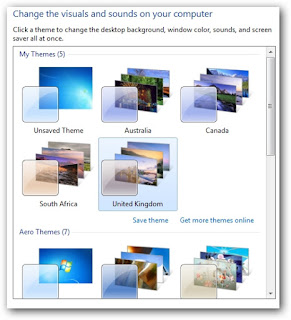


 3. That a create a shortcut to the theme and wallpapers in the personalization section of the control panel .Now use it like every other theme and background wallpaper, with the right mouse button on the desktop, select you adaptation, use any background or the topic to select. They will be specified in their own section.


 Subscribe to get latest tips and tricks..............!!


Read More

Thursday, 10 March 2016

Unknown

how to make your usb bootable ?

how  to make your usb bootable ? 


1. insert usb in the computer

2. open start menu and open command promt in mode of administrator and then type 
    diskpart

3. In the new command line window that opens, to determine the USB flash drive number or drive letter, at the command prompt, type list disk, and then click ENTER. The list disk command displays all the disks on the computer. Note the drive number or drive letter of the USB flash drive.

 4.select the drive and then press enter

5.Then foramt your drive by typing clean

6.After following upper instruction type active and then press enter

7.After finishing type exit and then enter  

Read More

Wednesday, 9 March 2016

Unknown

How To Watch 3-D Movies On VLC player..?


Everyone loves to watch movies with 3-D and 4-D effects. There are many ways of watching movies but we want the thing which suit us the most.

In our daily life we use VLC Media Player for watching movies but we never came to the point that we can also use it with 3D effects .since now a days every week and a month  3D movies are launched and this trend is increasing rapidly.
 The love for the 3D movies is turning into addiction
.

Here i ll be showing you the simple trick through which you will be able to have your effects.

1> Open VLC Media Player .

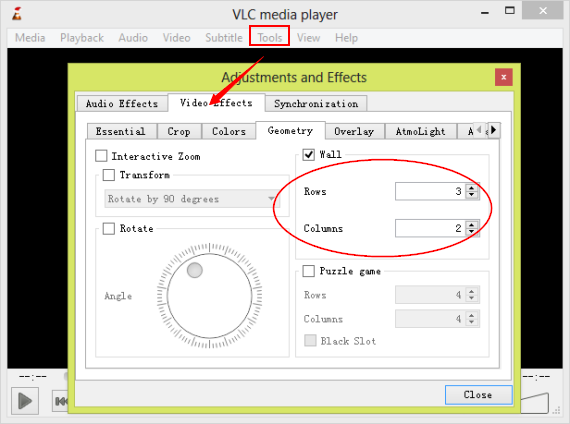
2> Click tools in the menu bar..

3> Choose Effects and Filters.

4> Choose Video Effects.


5> . Select Advance and then check "anaglyph 3D" box.


6> Now goto geometry heading, you see a box for "Wall".

7>  Click on that box and arrange rows-3 and columns-2.


8>  Now VLC will appear in a multiple window.  

9> Choose any one of that window and watch it in full screen with 3-D effects.

 Enjoy the 3-D movie .......!!


*********************************************************************************

Subscribe to get latest tips and tricks..............!!


Read More

Monday, 7 March 2016

Unknown

How To Download Torrents With the Help of IDM..?


In today world most of the downloading is being done through IDM. Since it is most powerful downloader as its download the things in parts and optimize the downloading speed.

But most of the material which we want to download are available on Torrents . At that point IDM has its limitation and cannot perform downloading.

 This limitation of IDM can be removed by following this simple trick.
So here is the process..

1>  First of all you have to install the IDM  on your PC . Here is the link for IDM with Keygen

http://freescrackedsoftware.blogspot.com/2016/02/internet-download-manager-is-tool-to.html

2>  Now go to www.zbigz.com website as shown below.

3>  Now copy any torrent file link address or download the torrent file .

4> Now paste the link in the upload box or upload the torrent file as shown below

5> Now click on go free button.

6> Yor are done . A following window will appear and you are ready to download.


If you have any queries, Do ask.......!!

Subscribe to get latest tips and tricks on daily basis................................................................

Read More